
Client-side. It needs nothing but BepInExPack Valheim, and nothing has to be installed on the server.
Po stronie klienta. Potrzebuje tylko BepInExPack Valheim, na serwerze nie trzeba nic instalować.
What it doesCo robi
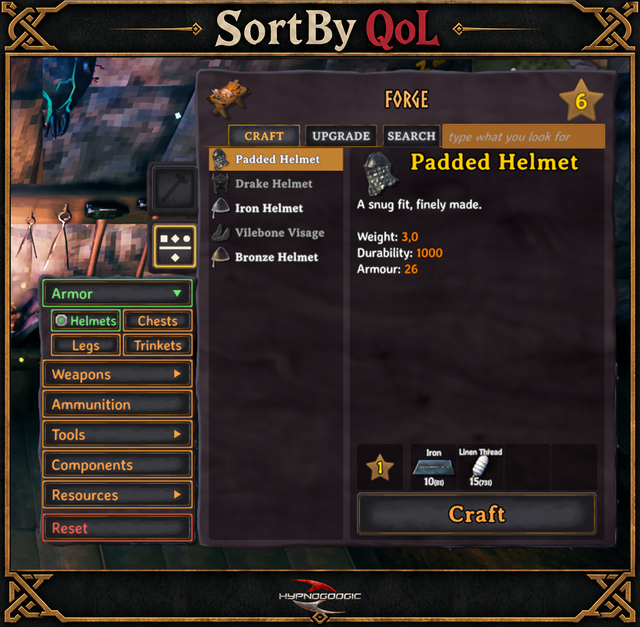
Works at every crafting station: workbench, forge, black forge, cauldron, stonecutter, artisan table, magic table and stations added by other mods.
- Sorting panel: Armor, Weapons, Ammunition, Tools, Components, Other, Resources and Reset. At the cauldron: Stamina, Health, Eitr, Biome and Reset.
- Search panel: find recipes by name.
- Quick repair: opening a station repairs everything it can.
Działa w każdym stole rzemieślniczym: warsztacie, kuźni, czarnej kuźni, kotle, kamieniarzu, stole rzemieślnika, stole magicznym i stołach dodanych przez inne mody.
- Panel sortowania: Armor, Weapons, Ammunition, Tools, Components, Other, Resources i Reset. W kotle: Stamina, Health, Eitr, Biome i Reset.
- Panel wyszukiwania: receptury znajdziesz po nazwie.
- Szybka naprawa: otwarcie stołu naprawia wszystko, co się da.
ScreenshotsZrzuty ekranu


InstallationInstalacja
Requirement: BepInExPack Valheim.
With r2modman find QoL_SortBy_RepairALL, choose Download with dependencies and Start modded. Manual install: put SortByQoL.dll into Valheim/BepInEx/plugins/.
Quick repair can be switched off in BepInEx/config/p0kahontazz.sortbyqol.cfg.
Wymaganie: BepInExPack Valheim.
W r2modman znajdź QoL_SortBy_RepairALL, wybierz Download with dependencies i Start modded. Ręcznie: wrzuć SortByQoL.dll do Valheim/BepInEx/plugins/.
Szybką naprawę można wyłączyć w BepInEx/config/p0kahontazz.sortbyqol.cfg.
Also by Hypnogoogic: ImmersiveTrader, traders, contracts and quests, and Advanced Backpack.
Także od Hypnogoogic: ImmersiveTrader, handlarze, kontrakty i zadania, oraz Advanced Backpack.
AdvertisementReklama